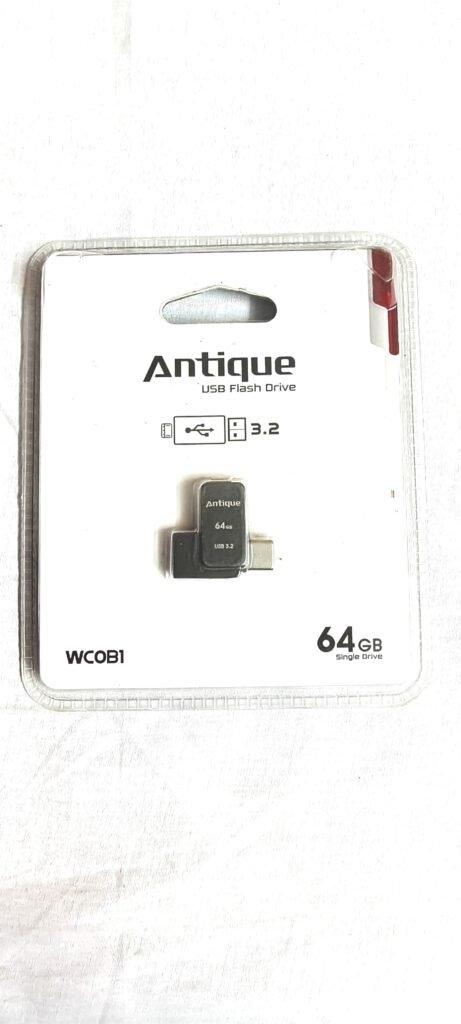
Lexar JumpDrive Dual Drive D400 64GB হলো USB Type-C ও USB Type-A—দুই ধরনের connector-যুক্ত একটি 2-in-1 flash drive। এর মাধ্যমে compatible Android smartphone, tablet, laptop এবং desktop computer-এর মধ্যে ছবি, ভিডিও, document ও অন্যান্য file transfer করা যায়।
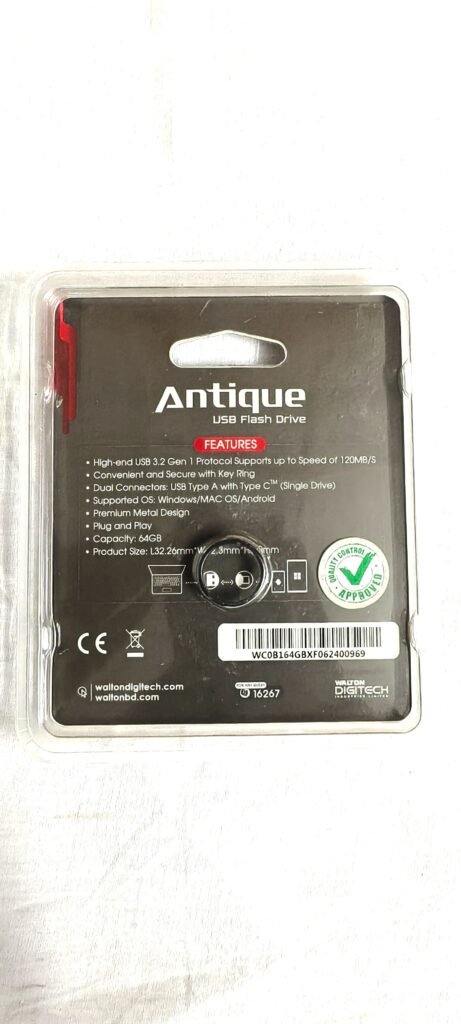
আমাদের কাছে থাকা Lexar JumpDrive Dual Drive D400 64GB-এর retail packaging এবং প্যাকেটে মুদ্রিত specification পর্যবেক্ষণের ভিত্তিতে এই reviewটি তৈরি করা হয়েছে। পোস্টে ব্যবহৃত ছবিগুলো আমাদের নিজস্বভাবে তোলা।
Lexar JumpDrive D400 64GB-এর প্রধান বৈশিষ্ট্য
Packaging অনুযায়ী Lexar JumpDrive Dual Drive D400-এ রয়েছে:
- 64GB storage capacity
- USB Type-C connector
- USB Type-A connector
- USB 3.2 Gen 1 interface
- সর্বোচ্চ 130MB/s claimed read speed
- 2-in-1 dual-drive design
- Smartphone, tablet ও computer compatibility
- AES-256 encryption support-এর উল্লেখ
- Lexar DataShield software-এর মাধ্যমে file protection
- Compact ও portable design
- Sliding বা rotating connector protection
- Product code: LJDD400064G-BNQNG
- Model: D400
- Made in China
Lexar JumpDrive Dual Drive D400 Specification
- Brand: Lexar
- Product name: JumpDrive Dual Drive D400
- Model: D400
- Product type: Dual USB Flash Drive
- Storage capacity: 64GB
- USB interface: USB 3.2 Gen 1
- Connector 1: USB Type-C
- Connector 2: USB Type-A
- Claimed maximum read speed: Up to 130MB/s
- Security: AES-256 encryption support
- Security software: Lexar DataShield
- Compatible devices: Smartphone, tablet ও computer
- Product code: LJDD400064G-BNQNG
- Colour: Silver ও Black
- Country of manufacture: China
Dual Type-C ও Type-A Connector
Lexar D400-এর সবচেয়ে গুরুত্বপূর্ণ সুবিধা হলো একই flash drive-এ USB Type-C এবং USB Type-A connector থাকা।
USB Type-C connector ব্যবহার করা যায়:
- Compatible Android smartphone
- Type-C tablet
- Modern laptop
- USB-C desktop
- USB-C Mac computer
- অন্যান্য OTG-supported Type-C device
USB Type-A connector ব্যবহার করা যায়:
- Desktop computer
- Standard USB port-যুক্ত laptop
- Smart TV
- Car audio system
- Media player
- Printer
- অন্যান্য USB-compatible device
এই dual-connector design-এর কারণে আলাদা OTG adapter ছাড়াই phone ও computer-এর মধ্যে file transfer করা সহজ হতে পারে।
64GB Storage Capacity
Packaging অনুযায়ী flash driveটির advertised capacity 64GB।
এই storage ব্যবহার করা যেতে পারে:
- Smartphone-এর ছবি backup করতে
- ভিডিও সংরক্ষণে
- Office document বহনে
- PDF ও presentation রাখতে
- Music ও movie সংরক্ষণে
- Software installer রাখতে
- Computer ও phone-এর মধ্যে file transfer করতে
- Bootable USB তৈরি করতে
- গুরুত্বপূর্ণ file-এর অস্থায়ী backup রাখতে
তবে device-এ connect করার পর সম্পূর্ণ 64GB usable storage দেখা যাবে না। Manufacturer-এর capacity calculation, formatting এবং file system-এর কারণে usable storage কিছুটা কম হওয়া স্বাভাবিক।
USB 3.2 Gen 1 Interface
Lexar JumpDrive D400-এ USB 3.2 Gen 1 interface-এর উল্লেখ রয়েছে।
USB 3.2 Gen 1-এর theoretical interface bandwidth সর্বোচ্চ 5Gbps পর্যন্ত হতে পারে। তবে flash drive-এর actual transfer speed interface bandwidth-এর সমান হবে না।
বাস্তব performance নির্ভর করবে:
- Computer বা phone-এর USB port
- Source storage-এর speed
- File size
- File type
- Drive কতটা পূর্ণ
- Read নাকি write operation
- Operating system
- File system
- Background antivirus scan
- Device temperature
- Connected port USB 2.0 নাকি USB 3.x
USB 2.0 port-এ driveটি কাজ করতে পারে, তবে transfer speed USB 2.0-এর সীমার মধ্যে নেমে যাবে।
সর্বোচ্চ 130MB/s Read Speed
Packaging-এ “Up to 130MB/s Read” লেখা রয়েছে। অর্থাৎ compatible পরিবেশে সর্বোচ্চ 130MB/s পর্যন্ত read speed পাওয়ার দাবি করা হয়েছে।
এখানে গুরুত্বপূর্ণ বিষয় হলো:
- এটি maximum claimed read speed
- Write speed আলাদাভাবে packaging-এ লেখা নেই
- ছোট file transfer-এর speed কম হতে পারে
- USB 2.0 port-এ এই speed পাওয়া যাবে না
- Source device ধীর হলে speed কমবে
- Drive গরম হলে performance কমতে পারে
- Actual result device ও usage অনুযায়ী পরিবর্তিত হবে
প্রকৃত speed পরীক্ষা করতে benchmark software ব্যবহার করা যায়।
যেমন:
- CrystalDiskMark
- ATTO Disk Benchmark
- Blackmagic Disk Speed Test
- H2testw
- F3
Read Speed ও Write Speed-এর পার্থক্য
Read speed হলো flash drive থেকে computer বা phone-এ file নেওয়ার গতি।
Write speed হলো computer বা phone থেকে flash drive-এ file copy করার গতি।
Packaging-এ 130MB/s পর্যন্ত read speed উল্লেখ থাকলেও write speed উল্লেখ নেই। সাধারণত flash drive-এর write speed read speed-এর তুলনায় কম হতে পারে।
বড় single video file তুলনামূলক দ্রুত transfer হতে পারে, কিন্তু হাজার হাজার ছোট file copy করতে বেশি সময় লাগতে পারে।
Smartphone-এ ব্যবহার
USB Type-C connector থাকার কারণে compatible Android smartphone ও tablet-এ driveটি ব্যবহার করা যায়।
Phone-এ ব্যবহারের জন্য প্রয়োজন হতে পারে:
- USB Type-C port
- OTG support
- Compatible file system
- File Manager app
- USB storage permission
- পর্যাপ্ত battery charge
Phone-এ driveটি ব্যবহার করা যেতে পারে:
- Camera photo backup করতে
- Video transfer করতে
- Phone storage খালি করতে
- Computer থেকে movie phone-এ নিতে
- Document বহন করতে
- Offline media দেখতে
- WhatsApp বা Messenger-এর media backup করতে
- জরুরি file transfer করতে
সব Type-C phone OTG storage support করে না। তাই কেনার আগে নিজের phone-এর specification যাচাই করা উচিত।
Phone ও Computer-এর মধ্যে File Transfer
Lexar D400-এর dual-drive design phone ও computer-এর মধ্যে internet ছাড়া file transfer করতে সহায়তা করে।
সাধারণ ব্যবহার পদ্ধতি:
- Type-C connector phone-এ লাগান।
- File Manager খুলুন।
- প্রয়োজনীয় file flash drive-এ copy করুন।
- Transfer শেষ হলে drive unmount করুন।
- USB Type-A connector computer-এ লাগান।
- File Explorer থেকে file copy করুন।
- কাজ শেষে safely eject করুন।
একই সময়ে দুই connector ব্যবহার করা উচিত নয়।
iPhone-এর সঙ্গে ব্যবহার করা যাবে কি?
পুরোনো Lightning-port iPhone-এ এই flash drive সরাসরি ব্যবহার করা যাবে না।
USB-C port-যুক্ত iPhone model-এ connector physically fit করতে পারে। তবে file system, power requirement এবং iOS compatibility পরীক্ষা করতে হবে।
Packaging-এ iPhone বা iOS support আলাদাভাবে উল্লেখ নেই। তাই সব iPhone-এর সঙ্গে নিশ্চিতভাবে কাজ করবে—এমন দাবি করা ঠিক নয়।
Windows Computer-এ ব্যবহার
Compatible Windows computer-এ সাধারণত driveটি plug-and-play পদ্ধতিতে ব্যবহার করা যায়।
ব্যবহার পদ্ধতি:
- USB Type-A বা compatible Type-C port-এ drive লাগান।
- Windows drive detect হওয়া পর্যন্ত অপেক্ষা করুন।
- File Explorer খুলুন।
- This PC থেকে Lexar drive নির্বাচন করুন।
- প্রয়োজনীয় file copy বা move করুন।
- কাজ শেষে Safely Remove Hardware ব্যবহার করুন।
Drive detect না হলে অন্য port বা অন্য computer-এ পরীক্ষা করুন।
Mac Computer-এ ব্যবহার
USB Type-C connector থাকার কারণে compatible MacBook বা Type-C Mac computer-এ ব্যবহার করা যেতে পারে।
তবে Windows, Mac ও Android—সব platform-এ ব্যবহার করতে চাইলে file system গুরুত্বপূর্ণ।
FAT32
- Windows ও Mac-এ compatible
- অনেক Android device support করে
- 4GB-এর বড় single file রাখা যায় না
exFAT
- Windows ও Mac উভয়ের জন্য সুবিধাজনক
- 4GB-এর বড় file support করে
- অনেক modern Android device support করে
NTFS
- Windows-এ ভালো support
- Mac-এ defaultভাবে write limitation থাকতে পারে
- কিছু Android phone detect নাও করতে পারে
Format করার আগে প্রয়োজনীয় file backup করতে হবে।
AES-256 Encryption
Packaging-এ AES-256 encryption-এর উল্লেখ রয়েছে। Lexar DataShield software ব্যবহার করে নির্দিষ্ট file password-protected vault-এর মধ্যে রাখা যেতে পারে।
এর সম্ভাব্য সুবিধা:
- ব্যক্তিগত document protect করা
- Office file secured রাখা
- Unauthorized access কমানো
- Password ছাড়া encrypted file খোলা কঠিন করা
- Drive হারিয়ে গেলে sensitive file-এর ঝুঁকি কমানো
তবে encryption ব্যবহারের আগে software compatibility, password recovery এবং operating system support সম্পর্কে নিশ্চিত হওয়া জরুরি।
Password ভুলে গেলে encrypted file recover করা কঠিন বা অসম্ভব হতে পারে।
Lexar DataShield Software
Lexar DataShield সাধারণত password-protected vault তৈরি করতে ব্যবহৃত security software।
ব্যবহারের আগে:
- Official Lexar source থেকে software সংগ্রহ করুন
- Operating system compatibility দেখুন
- Strong password ব্যবহার করুন
- Password নিরাপদ স্থানে সংরক্ষণ করুন
- Encrypted file-এর আলাদা backup রাখুন
- Software update আছে কি না পরীক্ষা করুন
Packaging-এ software-এর বিস্তারিত setup instruction দেওয়া নেই। তাই ব্যবহার করার আগে official documentation দেখা উচিত।
গুরুত্বপূর্ণ Data রাখার ক্ষেত্রে সতর্কতা
AES-256 encryption support থাকলেও flash drive গুরুত্বপূর্ণ data-এর একমাত্র backup হওয়া উচিত নয়।
কারণ flash drive:
- হারিয়ে যেতে পারে
- Physical damage হতে পারে
- File system corrupt হতে পারে
- Controller failure হতে পারে
- Connector নষ্ট হতে পারে
- Accidentally format হয়ে যেতে পারে
- Password হারালে encrypted data inaccessible হতে পারে
গুরুত্বপূর্ণ data অন্তত দুই জায়গায় backup রাখা ভালো।
Sliding বা Rotating Design
ছবিতে দেখা যায় Lexar D400-এ দুই connector-এর মধ্যে switching করার জন্য একটি rotating বা sliding body design রয়েছে।
এর সুবিধা:
- Connector কিছুটা protected থাকে
- আলাদা cap হারানোর ভয় নেই
- Type-C ও Type-A connector দ্রুত পরিবর্তন করা যায়
- Compact body বজায় থাকে
- বহন করা সহজ
তবে mechanism-এ ধুলো জমলে বা অতিরিক্ত চাপ পড়লে connector movement কঠিন হতে পারে।
Flash Drive গরম হওয়া
File transfer-এর সময় flash drive কিছুটা গরম হতে পারে, বিশেষ করে:
- বড় file copy করলে
- দীর্ঘসময় read বা write operation চললে
- High-speed USB port ব্যবহার করলে
- Metal body হলে
- Phone-এর Type-C port-এ দীর্ঘসময় লাগানো থাকলে
হালকা গরম হওয়া স্বাভাবিক হতে পারে। তবে অতিরিক্ত গরম, বারবার disconnect, burning smell বা file corruption দেখা দিলে ব্যবহার বন্ধ করা উচিত।
বড় File Copy করা যাবে কি?
4GB-এর বড় single file copy করা যাবে কি না, তা drive-এর file system-এর ওপর নির্ভর করে।
FAT32 format হলে 4GB-এর বড় single file copy করা যাবে না।
exFAT বা NTFS format হলে বড় file রাখা সম্ভব হতে পারে।
“File too large” error এলে storage খালি থাকা সত্ত্বেও file system limitation কারণ হতে পারে।
Drive Format করার নিয়ম
Format করলে flash drive-এর সব file মুছে যাবে।
Format করার আগে:
- গুরুত্বপূর্ণ file backup নিন।
- সঠিক drive নির্বাচন করুন।
- প্রয়োজন অনুযায়ী FAT32, exFAT বা NTFS নির্বাচন করুন।
- Phone, Mac ও Windows compatibility বিবেচনা করুন।
- Format চলার সময় drive খুলবেন না।
- Format শেষে test file copy করুন।
- Safely eject করুন।
ভুল drive নির্বাচন করলে অন্য storage-এর data মুছে যেতে পারে।
Original Capacity যাচাই
Fake-capacity flash drive-এ device 64GB দেখালেও actual storage কম থাকতে পারে।
Full capacity যাচাইয়ের জন্য:
- Drive computer-এ connect করুন।
- H2testw বা F3-এর মতো tool ব্যবহার করুন।
- পুরো storage-এ test data লিখুন।
- Verification সম্পূর্ণ হতে দিন।
- Error বা corrupted sector আছে কি না দেখুন।
- Test চলার সময় drive খুলবেন না।
Full test complete হতে সময় লাগতে পারে।
Original Product যাচাই
Packaging-এর সামনে Global Brand-এর “Authorized Product” hologram sticker দেখা যাচ্ছে।
Original product যাচাইয়ের সময়:
- Hologram sticker অক্ষত কি না দেখুন
- Product code মিলিয়ে নিন
- Barcode পরীক্ষা করুন
- Packaging print quality দেখুন
- Lexar logo ও model মিলিয়ে নিন
- Seller invoice সংগ্রহ করুন
- Warranty provider নিশ্চিত করুন
- Full-capacity test করুন
- Read/write benchmark করুন
- সন্দেহজনক কম দাম এড়িয়ে চলুন
শুধু packaging দেখে শতভাগ authenticity নিশ্চিত করা যায় না।
Product Code ও Barcode
Packaging অনুযায়ী product code:
LJDD400064G-BNQNG
Barcode-এর নিচে Made in China উল্লেখ রয়েছে।
Product code seller invoice বা warranty claim-এর সময় কাজে লাগতে পারে। কেনার সময় packaging ও product information মিলিয়ে দেখা উচিত।
Warranty Information
Packaging-এর পেছনে “5 Years” warranty symbol দেখা যাচ্ছে। তবে বাংলাদেশে warranty support distributor, importer বা seller-এর policy অনুযায়ী পরিবর্তিত হতে পারে।
Warranty claim-এর আগে যাচাই করুন:
- Local warranty আছে কি না
- Replacement warranty নাকি service warranty
- Purchase receipt প্রয়োজন কি না
- Physical damage cover করে কি না
- Data loss cover করে কি না
- Authorized distributor কে
- Warranty duration সত্যিই পাঁচ বছর কি না
Flash drive-এর warranty থাকলেও stored data সাধারণত warranty-এর আওতায় থাকে না।
Drive Detect না হলে কী করবেন?
Computer বা phone drive detect না করলে:
- অন্য USB port ব্যবহার করুন।
- অন্য device-এ পরীক্ষা করুন।
- Connector পরিষ্কার করুন।
- Phone-এর OTG option চালু করুন।
- Computer restart করুন।
- Disk Management পরীক্ষা করুন।
- Drive letter assign হয়েছে কি না দেখুন।
- File system compatible কি না দেখুন।
- গুরুত্বপূর্ণ data থাকলে format করবেন না।
- Seller-এর replacement policy ব্যবহার করুন।
File Transfer Slow হলে
Transfer speed কম হলে:
- USB 3.x port ব্যবহার করুন
- USB hub বাদ দিয়ে সরাসরি connect করুন
- Source storage-এর speed পরীক্ষা করুন
- Antivirus scan সাময়িকভাবে observe করুন
- অনেক ছোট file zip করে transfer করুন
- Drive প্রায় পূর্ণ কি না দেখুন
- অন্য computer-এ benchmark করুন
- USB 2.0 port এড়িয়ে চলুন
- Background heavy task বন্ধ করুন
Up to 130MB/s marketing figure সব file transfer-এ পাওয়া যাবে না।
Data Corruption এড়ানোর উপায়
Data নিরাপদ রাখতে:
- File transfer চলার সময় drive খুলবেন না
- Phone থেকে unmount করুন
- Computer থেকে safely eject করুন
- Drive পুরোপুরি পূর্ণ করবেন না
- গুরুত্বপূর্ণ file-এর backup রাখুন
- Unknown computer-এ ব্যবহারের পর virus scan করুন
- পানির সংস্পর্শ এড়িয়ে চলুন
- Connector বাঁকাবেন না
- অতিরিক্ত তাপ থেকে দূরে রাখুন
- Error দেখালে দ্রুত data copy করে নিন
Smart TV ও Car Audio-তে ব্যবহার
USB Type-A connector থাকার কারণে compatible smart TV বা car audio system-এ media playback-এর জন্য ব্যবহার করা যেতে পারে।
তবে compatibility নির্ভর করবে:
- Device-এর maximum supported capacity
- File system
- Audio/video format
- USB port power
- Device firmware
কিছু পুরোনো device 64GB বা exFAT drive support নাও করতে পারে।
Bootable USB হিসেবে ব্যবহার
Compatible computer-এ Lexar D400 ব্যবহার করে bootable USB তৈরি করা যেতে পারে।
ব্যবহার করা যায়:
- Windows installer
- Linux live USB
- Recovery drive
- Antivirus rescue media
- BIOS update file
Bootable drive তৈরি করলে existing data মুছে যেতে পারে। তাই আগে backup নিতে হবে।
ভালো দিক
Type-C ও Type-A Dual Connector
Phone, tablet, laptop ও desktop-এর মধ্যে file transfer সহজ করে।
64GB Storage
ছবি, ভিডিও, document ও সাধারণ backup-এর জন্য ব্যবহারযোগ্য capacity।
USB 3.2 Gen 1
Compatible port-এ তুলনামূলক দ্রুত data transfer-এর সুযোগ।
Up to 130MB/s Read Speed
Packaging অনুযায়ী সর্বোচ্চ 130MB/s read speed-এর দাবি রয়েছে।
AES-256 Encryption
Sensitive file password protection-এর সুবিধা পাওয়া যেতে পারে।
Lexar DataShield Support
Encrypted vault তৈরি করার software support রয়েছে।
Compact Design
সহজে পকেট বা ব্যাগে বহন করা যায়।
Connector Protection
Rotating বা sliding body হওয়ায় আলাদা cap প্রয়োজন হয় না।
Trusted Brand
Lexar storage product-এর পরিচিত একটি brand।
Packaging-এ 5-Year Warranty Symbol
দীর্ঘমেয়াদি warranty-এর ইঙ্গিত পাওয়া যায়, তবে local policy যাচাই করতে হবে।
সীমাবদ্ধতা
Write Speed উল্লেখ নেই
Packaging-এ শুধু maximum read speed লেখা রয়েছে।
Actual Speed পরীক্ষা করা হয়নি
Professional benchmark ছাড়া বাস্তব performance নিশ্চিত করা যায় না।
iPhone Compatibility স্পষ্ট নয়
USB-C iPhone-এ কাজ করবে কি না আলাদাভাবে পরীক্ষা করতে হবে।
OTG Support Device-নির্ভর
সব Type-C phone flash drive detect নাও করতে পারে।
DataShield Compatibility যাচাই প্রয়োজন
সব operating system-এ software একইভাবে কাজ নাও করতে পারে।
Waterproof Rating নেই
পানি, ধুলা বা shock resistance-এর certification packaging-এ দেখা যায়নি।
Important Data-এর একমাত্র Backup নয়
Flash storage failure হলে data হারিয়ে যেতে পারে।
Usable Capacity কম হবে
Formatting-এর পর 64GB-এর পুরোটা ব্যবহারযোগ্য দেখা যাবে না।
কার জন্য ভালো?
Lexar JumpDrive Dual Drive D400 64GB উপযুক্ত হতে পারে:
- Phone ও computer-এর মধ্যে file transfer করেন
- USB Type-C Android phone ব্যবহার করেন
- আলাদা OTG adapter ব্যবহার করতে চান না
- ছবি ও video backup রাখতে চান
- Office document বহন করেন
- Password-protected storage চান
- Windows ও Mac computer ব্যবহার করেন
- Compact branded flash drive প্রয়োজন
- 64GB portable storage খুঁজছেন
- Smart TV বা car audio-তে media ব্যবহার করেন
কার জন্য উপযুক্ত নয়?
অন্য storage বিবেচনা করুন যদি প্রয়োজন হয়:
- 256GB বা তার বেশি storage
- Guaranteed high sustained write speed
- Professional 4K বা 8K video recording
- Waterproof বা industrial-grade protection
- Enterprise-level hardware encryption
- Guaranteed iPhone compatibility
- Long-term archival storage
- Mission-critical data storage
- External SSD-এর মতো high performance
কেনার আগে যা যাচাই করবেন
কেনার আগে পরীক্ষা করুন:
- Model D400 কি না
- Capacity 64GB কি না
- Product code LJDD400064G-BNQNG কি না
- Authorized Product sticker অক্ষত কি না
- Packaging seal ঠিক আছে কি না
- Type-A connector কাজ করে কি না
- Type-C connector কাজ করে কি না
- Phone OTG support করে কি না
- Drive computer-এ detect হয় কি না
- Read/write speed গ্রহণযোগ্য কি না
- Full-capacity test pass করে কি না
- Seller warranty ও replacement policy
- Purchase receipt
- Physical damage বা loose connector আছে কি না
আমাদের পর্যবেক্ষণ
আমাদের কাছে থাকা packaging থেকে নিশ্চিত হওয়া যায় এটি Lexar JumpDrive Dual Drive D400 64GB।
Packaging-এ স্পষ্টভাবে উল্লেখ রয়েছে:
- 64GB capacity
- JumpDrive Dual Drive D400
- USB Type-C connector
- USB Type-A connector
- USB 3.2 Gen 1
- Up to 130MB/s read speed
- AES-256 encryption
- 2-in-1 flash drive
- Smartphone, tablet ও computer compatibility
- Product code LJDD400064G-BNQNG
- Made in China
- 5-year warranty symbol
তবে packaging থেকে নিচের তথ্য নিশ্চিত করা যায়নি:
- Exact write speed
- Sustained write performance
- NAND flash type
- Controller model
- IP rating
- Shock resistance
- Operating temperature
- iOS compatibility
- Data retention period
- TBW বা endurance rating
- Local Bangladesh warranty-এর নির্দিষ্ট শর্ত
Final Verdict
Lexar JumpDrive Dual Drive D400 64GB হলো USB Type-C ও Type-A connector-যুক্ত একটি practical portable flash drive। Phone, tablet, laptop ও desktop-এর মধ্যে file transfer করার জন্য dual-interface designটি বিশেষভাবে সুবিধাজনক।
এর প্রধান সুবিধা:
- 64GB storage capacity
- Type-C ও Type-A dual connector
- USB 3.2 Gen 1 interface
- সর্বোচ্চ 130MB/s claimed read speed
- AES-256 encryption support
- Lexar DataShield security
- Compact rotating design
- Smartphone, tablet ও computer compatibility
- Packaging-এ 5-year warranty symbol
প্রধান সীমাবদ্ধতা:
- Write speed উল্লেখ নেই
- Actual speed ও capacity test করা হয়নি
- সব Type-C phone-এ OTG compatibility নিশ্চিত নয়
- iPhone compatibility স্পষ্ট নয়
- Waterproof বা shockproof rating নেই
- Flash drive গুরুত্বপূর্ণ data-এর একমাত্র backup হিসেবে নিরাপদ নয়
Android phone ও computer-এর মধ্যে ছবি, video ও document transfer করার জন্য branded dual-interface storage প্রয়োজন হলে Lexar JumpDrive D400 64GB একটি বিবেচনাযোগ্য option। কেনার পর capacity ও speed test করে নেওয়া এবং গুরুত্বপূর্ণ file-এর আলাদা backup রাখা উচিত।
কোথা থেকে কিনবেন?
Lexar JumpDrive Dual Drive D400 64GB-এর বর্তমান stock, price এবং warranty জানতে Dinajpur IT Park-এর সঙ্গে যোগাযোগ করুন।
WhatsApp: 01773-975423
সরাসরি WhatsApp:
https://wa.me/8801773975423
অর্ডারের সময় লিখুন:
Product: Lexar JumpDrive Dual Drive D400 64GB
Delivery location:
স্বচ্ছতা ঘোষণা: এই reviewটি আমাদের কাছে থাকা Lexar JumpDrive Dual Drive D400 64GB-এর retail packaging এবং packaging-এ মুদ্রিত specification পর্যবেক্ষণের ভিত্তিতে লেখা। পোস্টে ব্যবহৃত ছবিগুলো আমাদের নিজস্বভাবে তোলা। Drive-এর actual capacity, read speed, write speed, encryption performance, phone compatibility, operating temperature এবং long-term durability professional testing equipment দিয়ে পরীক্ষা করা হয়নি।
